
Materials

Incendia Materials
Incendia's materials are primarily defined using image maps to shade fractal elements. Each material consists of three components: Ambient, Diffuse, and Specular.
Material Components
- Ambient: The actual color of the fractal (or its baseshapes).
- Diffuse: The color of the light source that illuminates the fractal.
- Specular: The mirror-like reflection caused by the light source on the surface of the fractal.
Incendia uses the Phong reflection model for lighting, but textures enhance the fractal surface instead of solid colors.
Material Selection Buttons

Materials are organized as follows:
- There are 10 possible material definitions.
- Selected by the material index control (two arrow buttons and the index).
- Baseshapes can use any, but if no baseshape is present, the material at index `0` is used.
Each material has a Tab control with sections:
- Ambient: The Ambient term of the material (includes the Material Browser).
- Diffuse: The Diffuse illumination section (includes the Material Browser).
- Specular: The Specular index.
- Advanced: Advanced options like surface structure materials.
Material Browser

The Material Browser is available for both Ambient and Diffuse sections. It includes:
- A display of the selected texture.
- The Texture Library.
- Control buttons: Color, Grad., Ext. Tex., Texture Generator, Select.
Texture Library

Incendia's texture library consists of bitmaps and gradients for creating materials. Navigate using arrows, select a texture, and apply it with the "Select" button. External textures in BMP, JPG, PNG formats can also be used.
Color Gradients

- Color: Define a specific color.
- Grad.: Load a Fractint map file for gradient use.
- Ext. Tex.: Import an external texture.
- Texture Generator: Open the Texture Generator.
- Select: Apply the current selection.
Material Parameters
Ambient Parameters

- Intensity: Controls ambient brightness (0.5 for half, 2.0 for double).
- Rotation Angle: Rotates the texture by `n` degrees.
Diffuse Parameters
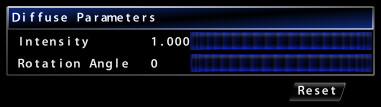
- Intensity: Similar to Ambient; controlled by light source.
- Rotation Angle: Rotates the diffuse texture by `n` degrees.
Specular Parameters

- Intensity: Controls specular brightness.
- Magnitude: Controls concentration of specular reflection.
Fresnel Equation Parameters (Fresnel Ext., Fresnel Int.)
Define external and internal refraction coefficients. Colors from skylight equations or bitmap backgrounds are used.
Shadow Depth Parameter
Determines shadow depth; shadows disappear at 1.0.
Reset Materials Button

Restores default material parameters for the current slot.